The CRM That Powers the Entire Client Relationship
Contacts, leads, domains, users, forms, communications, publishing,
social media, reviews, reputation, and delivery stay connected to one
protected client record instead of being scattered across disconnected tools.
Most CRMs Stop at Contacts. Agencies Have to Deliver After the Deal Closes.
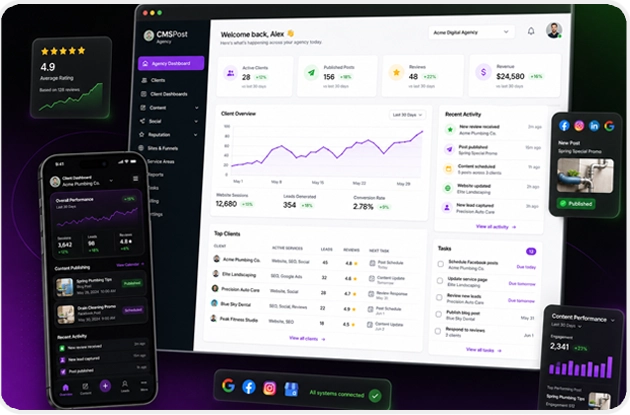
A client relationship is bigger than a name, phone number, and pipeline stage. CMSPost keeps the business,
domain, contacts, team, website, leads, communications, publishing, social accounts, reviews, and delivery
activity organized around one protected client record.
BEFORE CMSPOST
The client relationship gets scattered across the agency.
01Spreadsheets + NotesDomains, services, contacts, and history live in different places.
02Separate InboxesLeads and customer conversations lose the client relationship.
03Website + Publishing LoginsDelivery settings become tribal knowledge instead of account context.
04Social + Review AccountsConnected channels are managed away from the client record.
05Team MemoryThe agency depends on people remembering what belongs to whom.
CONNECTED CLIENT CONTEXT
CMSPOST
CRM + CLIENT MANAGEMENT
One client record. One relationship. One operating context.
The CRM becomes the organizing core for the business information and the work your agency performs after onboarding.
One Repeatable ProcessTrain the agency once and onboard the next client through the same operating model.
01ONBOARDCreate the Client FoundationBusiness, domain, contacts, users, services, and account identity.02ORGANIZEProtect the Client WorkspaceKeep the right records, people, settings, and connected accounts together.03DELIVERConnect the Agency WorkForms, communications, SEO, publishing, social, reviews, and more.04RETAINPreserve the RelationshipKeep ongoing activity and history understandable as the account grows.
1Client-Centered System
50Domains Per Bulk Onboarding Batch
4Core User Roles
100%White-Label Ready
THE DIFFERENCE
The client stops being a record in a CRM and becomes the operating context for the work your agency delivers.
Core CRM Capabilities
The Client Record Is Bigger Than Contacts. It Powers the Agency Relationship.
CMSPost keeps the customer relationship attached to the operational work.
The agency can understand the business, the people, the access, the incoming
demand, and the delivery systems from the same client-centered foundation.
01
Protected Client Workspaces
Give every customer a dedicated workspace for business information, domains, users, content, publishing settings, connected services, communications, and ongoing delivery.
02
Contacts & Leads
Keep customer contacts and lead context attached to the correct client so form activity and follow-up do not become disconnected records in unrelated systems.
03
Domains & Business Profiles
Organize the client around its real operating context: primary domain, company details, services, locations, service areas, website information, and business identity.
04
Team Assignment & Roles
Give agency owners, administrators, editors, and client users the access they need while preserving separation between client environments.
05
Client Activity Context
Understand the work surrounding each account without hunting across separate publishing, communication, social, and content systems.
06
Bulk Agency Onboarding
Stage larger client migrations and domain batches before completing individual client setup, helping agencies move established books of business into a repeatable system.
07
Forms & Lead Capture Context
Connect form submissions and website leads to the client relationship so new opportunities can move into contact and communications workflows with the right business context.
08
Communications Context
Keep branded replies, lead notifications, customer threads, and communication history connected to the client instead of scattered across personal inboxes.
09
White-Label Client Delivery
Present the agency's own name, logo, colors, support details, login experience, and protected client dashboards throughout the relationship.
What the CRM Remembers
Client Context That Stays With the Relationship.
The CRM is not just a list of names and email addresses. It keeps the
operational context the agency needs to understand who the client is,
what is connected, who has access, and what work is being delivered.
Business IdentityDomainsContactsLeadsAssigned UsersPermissionsFormsConversationsPublishing SettingsSocial AccountsReviewsHistoryDelivery Activity
The CRM Workflow
From New Account to Ongoing Delivery Without Losing the Client Context
CMSPost turns client management into a repeatable workflow so the
agency knows where the business information lives, who owns the work,
what is connected, and what happens next.
Create an account individually or use the agency
onboarding workflow to stage multiple client domains
before completing each client's setup.
Add the business name, domain, contacts, services,
service areas, website context, and other information
the agency needs to understand the account.
Give owners, administrators, editors, and client users
appropriate access while preserving the protected
boundaries between customer workspaces.
Attach the forms, communications, marketing context,
SEO content, website publishing, social accounts,
reviews, and other delivery settings used for that client.
Keep website leads, contacts, customer threads,
notifications, and follow-up connected to the client
relationship instead of losing context in separate tools.
Continue working from the same client context as the
agency publishes content, communicates, manages channels,
monitors reputation workflows, and supports the account.
From Lead to Relationship
The CRM Keeps the Customer Connected After the Form Is Submitted.
CMSPost connects intake, contact context, communication, delivery, and history
so a new inquiry does not become another disconnected record the agency has to reconstruct later.
01Form SubmittedThe inquiry enters the correct client workspace.→02Lead CreatedSource, form, and business context stay attached.→03Contact ConnectedThe person becomes part of the client relationship.→04Conversation BeginsReplies, notifications, and follow-up stay organized.→05Delivery ContinuesSEO, publishing, social, reviews, and service remain attached.→06History PreservedThe agency keeps the relationship context over time.
Why the CRM Matters
Less Tool-Chasing. More Client Context. A More Repeatable Agency.
The benefit of the CMSPost CRM is not simply storing names and email
addresses. It is giving the agency a consistent place to understand
the client and connect the work performed for that client.
01
One Source of Client Context
Keep the business, contacts, domain, team, forms, communications,
content, social connections, and delivery settings attached to
one account instead of spreading the relationship across tools.
02
Faster Client Onboarding
Start with a structured client profile and guided onboarding
process so new accounts enter the agency through the same
repeatable foundation.
03
Cleaner Team Accountability
Assign the right people to the right client environment and
reduce ambiguity about which customer, domain, or workflow a
team member is working on.
04
Better Lead Follow-Up Context
Keep form leads, contacts, and communications connected so the
team can understand where the inquiry came from and which client
relationship it belongs to.
05
Safer Client Separation
Keep client-specific records, users, publishing settings, and
connected accounts inside protected workspaces rather than
mixing customer access or credentials across the agency.
06
A System That Scales With the Agency
Standardize how clients are added, organized, assigned, connected,
and managed so growth does not require inventing a new process for
every account.
One Client Context Across CMSPost
One Client Record Powers Every Engine Around the Relationship.
CMSPost does not treat CRM as a separate database sitting beside delivery. The client workspace becomes the shared context
connecting demand, communication, content, publishing, reputation, users, and ongoing service.
CONTEXT IN01
Business ProfileName, services, locations, identity, and account details.
02
Contacts + LeadsPeople, inquiries, lead source, and relationship context.
03
Domains + WebsitesPrimary domain, website environment, and publishing context.
04
Team + RolesOwners, admins, editors, and client users assigned correctly.
→
CRM CORE
CLIENT WORKSPACE
The relationship lives here.
Business profile, domain, contacts, users, permissions, activity, connected services, and delivery settings.
Forms + InboxLead capture, replies, threads, notifications, and follow-up.
S
SEO + PublishingContent, service areas, website delivery, and domain context.
R
Social + ReputationConnected accounts, reviews, locations, and client-specific channels.
M
Marketing + CommunicationsContact-aware campaigns and branded client communication.
ACQUIREForms → Leads → Contacts
→
DELIVERSEO → Website → Social
→
RETAINInbox → Reviews → Relationship History
ONE CLIENT CONTEXT
Different engines. Same customer. No need to rebuild the relationship context every time the agency changes tools.
Reduce the Operational Mess
Stop Reconstructing the Client Relationship Every Time Your Team Changes Tools
Agencies often end up with one spreadsheet for domains, another
place for contacts, separate website logins, inbox threads,
social credentials, review tools, and notes that live with
individual team members. CMSPost gives the agency one structured
client context for the work it manages.
Replace scattered client spreadsheets with structured client records
Reduce disconnected contact and lead tracking
Keep account access organized by role and client
Connect delivery settings to the correct domain and business
Keep communications and forms closer to the CRM context
Build one repeatable onboarding and delivery workflow for the agency
Built for a Growing Agency
From 5 Clients to 50 to 500 — the Operating Model Stays the Same.
The goal is not to invent a new process every time the agency grows.
CMSPost keeps the same client-centered structure for onboarding, access,
connected engines, delivery, and retained history.
5ClientsBuild the foundation and learn one repeatable operating model.50ClientsUse bulk onboarding, protected workspaces, and consistent team roles.500ClientsScale the same client-centered structure without rebuilding the relationship model.
Agency→Client Workspace→Team→Engines→History
CMSPost CRM FAQs
Frequently Asked Questions
Learn how CMSPost organizes clients, contacts, leads, users, domains,
and delivery workflows inside the Agency Operating System.
CMSPost is built around the full agency-client relationship.
Contacts and leads live alongside the client workspace, business
profile, domain, assigned users, content, forms, communications,
publishing settings, social connections, reviews, and other
delivery context.
Yes. CMSPost organizes each customer inside a protected
client workspace so business information, domains, users,
content, settings, and connected accounts can remain separated
from other clients managed by the same agency.
CMSPost can organize contacts and lead context around the
correct client. Forms and communications workflows are designed
to keep new inquiries and customer conversations connected to
the business relationship instead of becoming isolated records.
Yes. CMSPost includes bulk agency onboarding workflows that
can stage larger domain batches before the agency completes
each individual client profile and delivery setup.
The agency can use role-based access for owners,
administrators, editors, and client users. The purpose is to
give each person the access needed for their responsibilities
while keeping client environments protected and separated.
The client workspace provides context for forms, communications,
SEO content, website publishing, social connections, reviews,
reputation workflows, users, and other client delivery settings.
This lets the agency operate around one customer record rather
than a collection of unrelated systems.
CMSPost is designed for white-label agency delivery. Agencies
can apply their branding across the platform experience so
client users interact with the agency's own name, logo,
colors, support details, and protected workspace.
The main benefit is consistency. CMSPost gives the agency
a repeatable way to add clients, organize information,
assign users, connect workflows, capture activity, and
continue delivery without rebuilding the operating process
for every new account.
One Client Record. One Agency Workflow.
Build the Agency Around the Client — Not Around Disconnected Tools.
Install CMSPost, add your clients, assign your team, connect leads and communications, attach delivery workflows,
and keep the ongoing relationship inside one protected white-label Agency Operating System.