

 AI Content + GEO SEO
Prospect Intelligence
Research prospects, assess digital gaps, organize opportunities, and prepare reviewed outreach.


Manage clients, discover new opportunities, create AI-powered SEO and GEO content, and publish across client websites—all from your own branded agency workspace. Automate more of your marketing while keeping control of your clients, your brand, and your server.

Launch your workspace, onboard clients, manage SEO and AI-powered content, and grow your agency—all from one connected platform.




























Run CMSPost from your own server and give clients a professional, white-label platform branded around your agency—not someone else’s software.

Scan an existing client website and organize its pages, URLs, headings, metadata, content, and assets without rebuilding everything manually.

Create and manage website content, blog posts, GEO pages, service-area pages, metadata, internal links, entities, schema, and structured data.

Publish to an existing client website using Universal Embed, Mirror Mode, Static Pull, WordPress, or another supported deployment workflow.

Keep every client’s profile, users, domains, content, SEO, leads, communications, social accounts, reviews, and activity securely connected.

Bring CMS, CRM, SEO, publishing, forms, email, communications, social media, reviews, reputation, and client delivery together in one lightweight system.
See where your website content needs attention. Scan up to 25 publicly accessible pages for thin content, exact duplicates, missing meta descriptions, and authorship signals worth reviewing.
Results are editorial review signals, not search ranking penalties.
From prospect research to SEO content and ongoing optimization, CMSPost keeps the workflow connected without replacing your clients' existing websites.
Research prospects, assess digital gaps, organize opportunities, and prepare reviewed outreach.
Capture client context, services, locations, and search opportunities before planning.
Build articles, service-area pages, comparisons, metadata, and advanced structured data for review.
Review relevant links, apply allowlisted changes with recovery backups, and identify content to refresh.
Your team stays in control: publishing and live edits remain subject to permissions, review, and supported integrations.
CMSPost keeps the business profile, domain, contacts, users, content, publishing, communications, social activity, reviews, and delivery history attached to the correct client workspace.
The CMS side manages what the agency creates and publishes. The CRM side keeps the people, relationship, communication, and account context connected to that work.
Instead of forcing the team to reconstruct a client across spreadsheets, inboxes, website dashboards, and disconnected tools, CMSPost gives the agency one place to understand the account and continue the work.
Add the client once, assign the team, connect the workflows, then acquire, deliver, communicate, publish, and retain from the same protected operating system.
Client-Centered System
Proven Social Channels
White-Label Ready
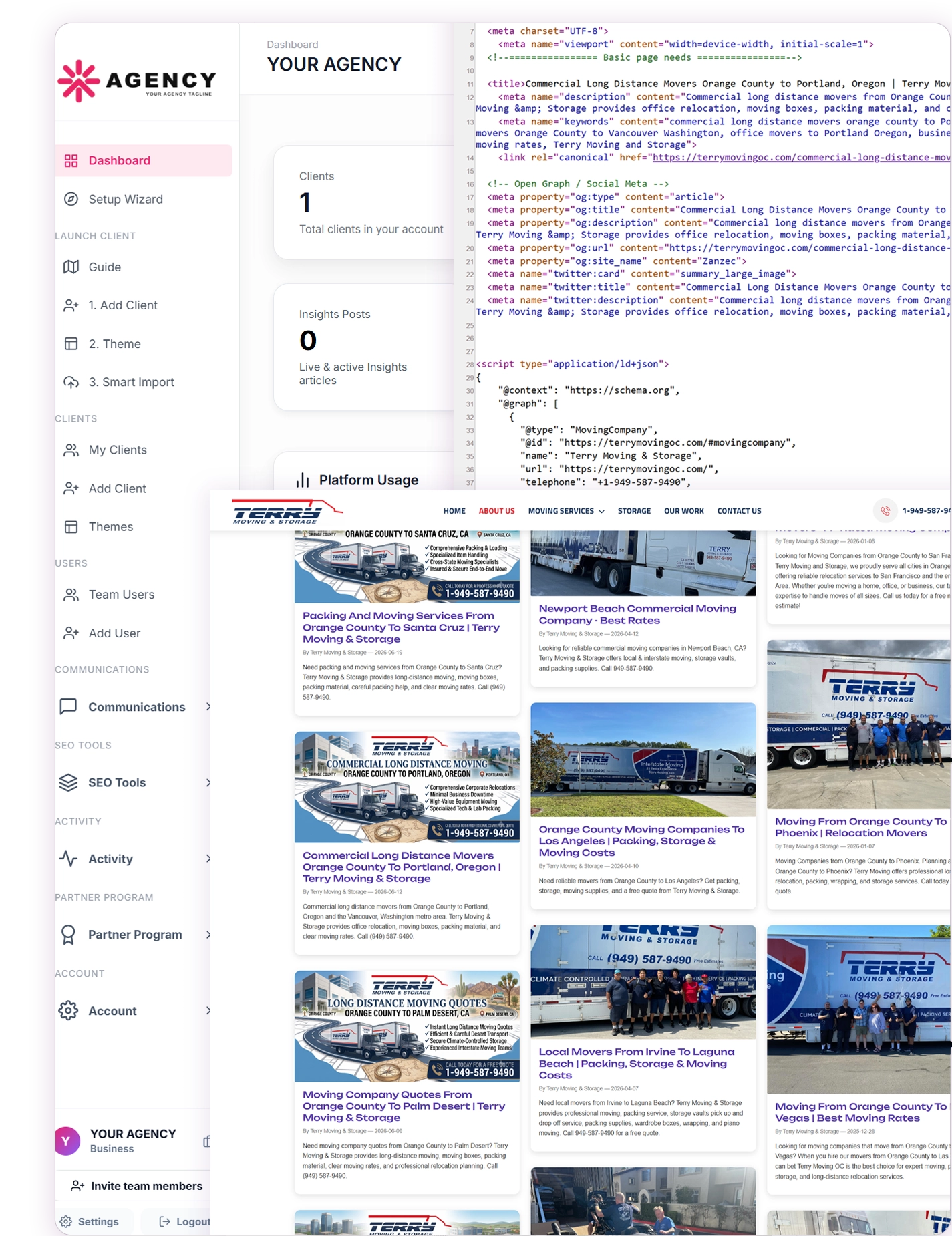
Manage client onboarding, SEO content, website publishing, social media, Google reviews, and reputation workflows from one lightweight, white-labeled platform.

Brand CMSPost with your agency name, logo, colors, support information, client dashboards, and team access.

Scan existing client websites, review discovered pages, and import selected content without starting the onboarding process from scratch.

Create blogs, insights, authorship content, and customized city pages using dynamic location, service, and keyword tokens.

Match existing client website designs and publish through Embed Mode, Mirror Mode, Static Pull Mode, or WordPress.

Connect and publish approved client content across Facebook, Instagram, LinkedIn, X, and YouTube using secure, client-isolated OAuth connections, with Pinterest support marked as coming soon.

Generate Google review widgets, connect business locations, organize response workflows, and help clients strengthen their online reputation.
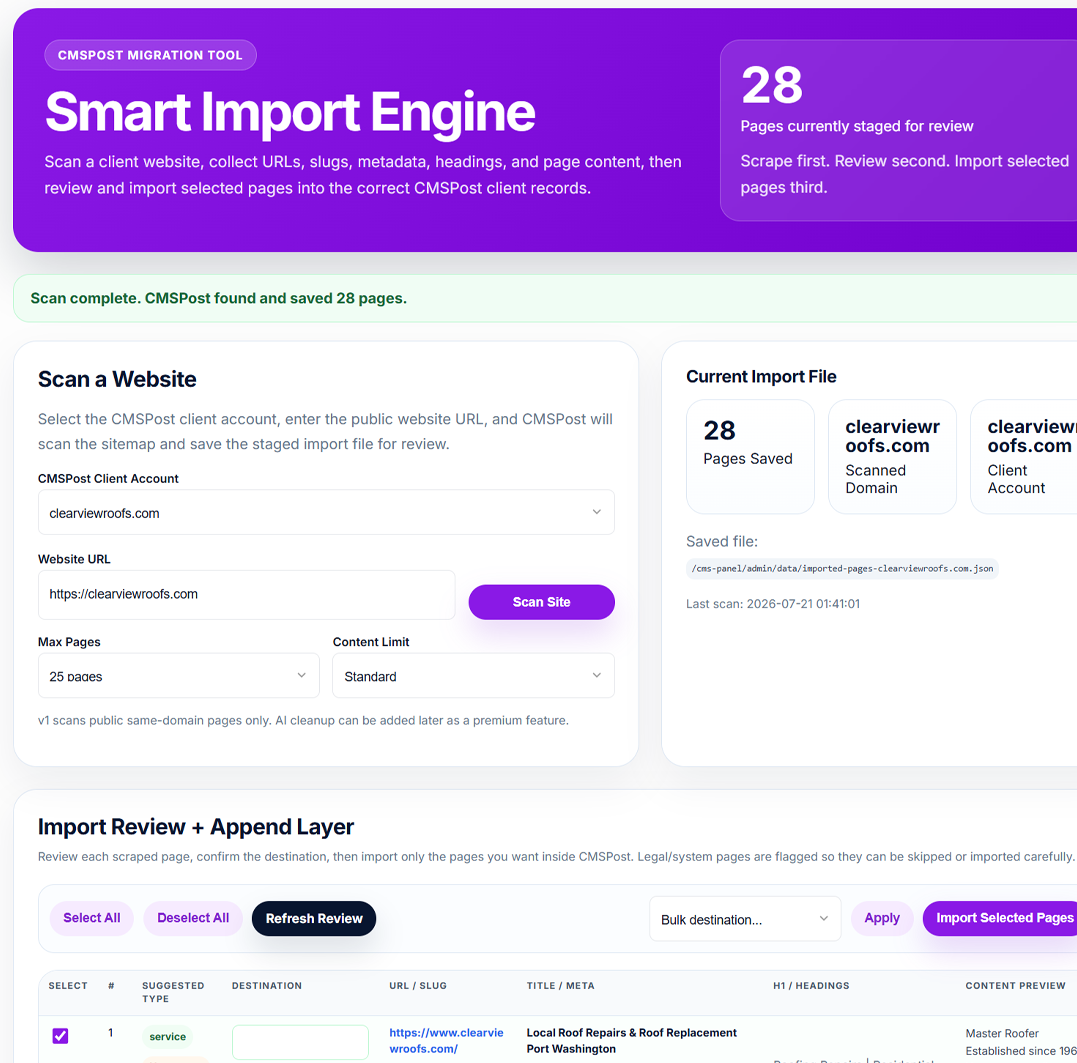
Smart Import scans the client’s current website, collects page URLs, titles, metadata, headings, slugs, and content, then lets your agency review exactly what should be added to the client’s CMSPost workspace.
Replace repetitive copying and manual setup with a guided migration workflow designed to help agencies launch new clients faster.

Enter the client’s public website address and CMSPost scans eligible same-domain pages for content, metadata, headings, and page structure.

Review discovered pages, confirm their destination, skip legal or system pages, and choose only the content the agency wants to keep.

Import selected pages into the correct CMSPost client records so the agency can organize, optimize, update, and publish them.
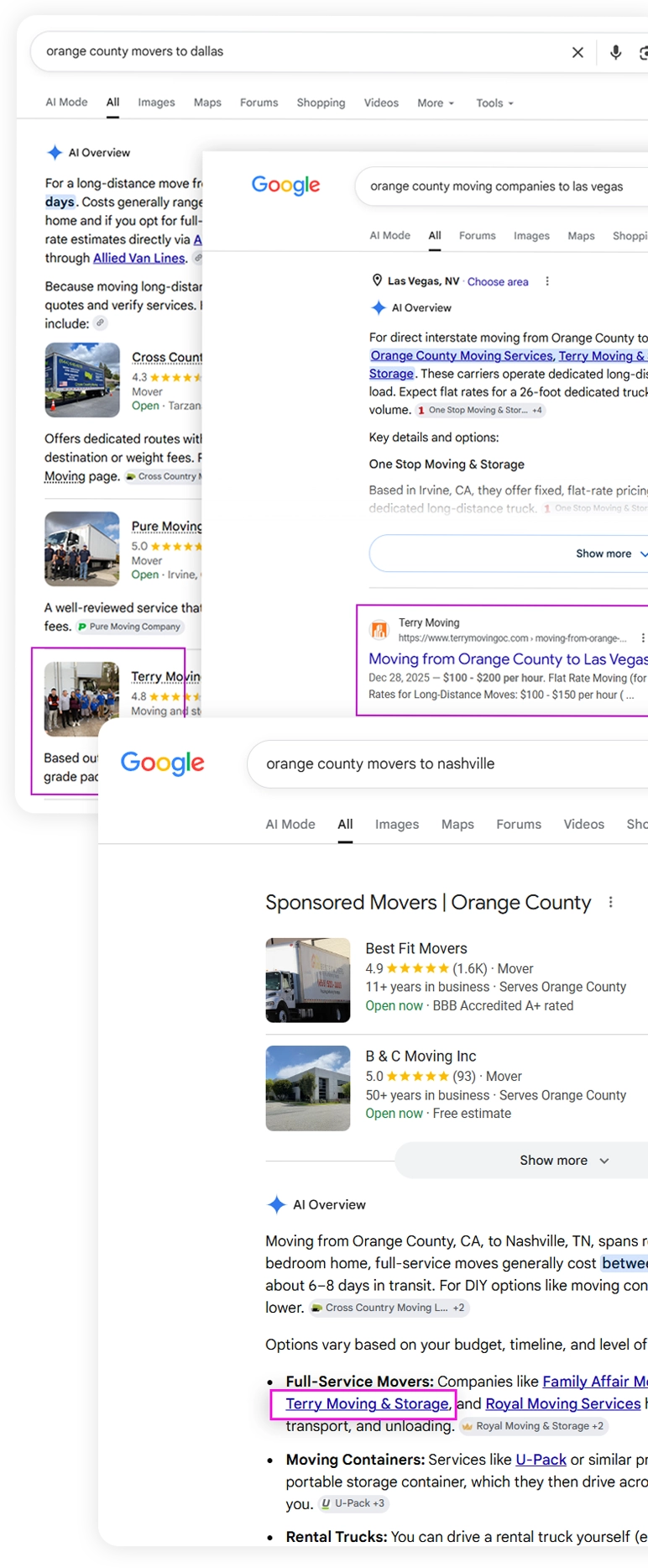
Example of locally targeted client content appearing in Google Search and AI-generated results. Visibility varies by market, competition, content quality, and website authority.
Expand a client’s local visibility with structured service-area pages customized for individual cities, services, keywords, counties, and geographic markets.

Build unique local pages using structured city, state, county, service, and keyword information for each targeted market.

Customize headings, page content, metadata, calls to action, and layouts using reusable location and keyword tokens.

Build each local landing page with text, images, banners, calls to action, FAQs, testimonials, coupons, discounts, hiring sections, city loops, comparison tables, card grids, and multi-column layouts.

Optimize titles, meta descriptions, headings, structured data, calls to action, and local content for each city and service.

Start with reusable layouts and tokens, then customize each city page with unique content, images, FAQs, testimonials, offers, and local details.
Start with reusable layouts and dynamic tokens, then customize each city page with its own content, metadata, schema, images, calls to action, testimonials, FAQs, and local market details.
Hyperlocal SEO PagesOrganize service-area campaigns by state, county, city, neighborhood, and metro market, then choose how CMSPost generates each local page URL using reusable GEO and keyword tokens.
Work from organized state and county datasets for major U.S. markets while keeping the agency in control of the exact locations included in each client campaign.
Choose a base city and radius, calculate nearby locations, then include only the markets that make sense for the client's real service footprint.
Structure local URLs around the keyword, city, state, county, or a custom token pattern instead of accepting one hard-coded format.
Build one campaign and let CMSPost render a consistent slug pattern across every selected location.
/water-heater-repair-houston-tx//houston-water-heater-repair//houston-tx-water-heater-repair//houston/CMSPost can organize blogs, service areas, resources, and other published content into clean visual listing pages that make large content libraries easier to browse while keeping every eligible item connected to a real website URL.
Structured content, internal links, schema, and location relevance in one client workflow.
Local content organized around a real destination URL.
Helpful content presented in a visual browsing experience.
Each card links visitors and crawlers to an individual published page.
Organize growing local libraries without creating a cluttered archive.
Visual discovery for visitors with clean paths into the underlying website content.
Present blogs, service areas, resources, and content in a modern card-based layout that helps visitors discover more of a client website without turning the experience into a disconnected app or dashboard.
Listing cards connect to individual CMSPost pages through the client website structure, giving visitors and search crawlers clear paths into the published content.
As eligible pages are published, CMSPost can keep the website sitemap current so the agency can submit that sitemap through Google Search Console and help Google discover the latest URLs. Sitemap submission supports discovery but does not guarantee indexing.
Add one lightweight code block to WordPress, Squarespace, Wix, Shopify, Webflow, GoDaddy, or a custom HTML/PHP website. CMSPost supplies the content while the client website keeps its own header, footer, navigation, fonts, colors, and layout.

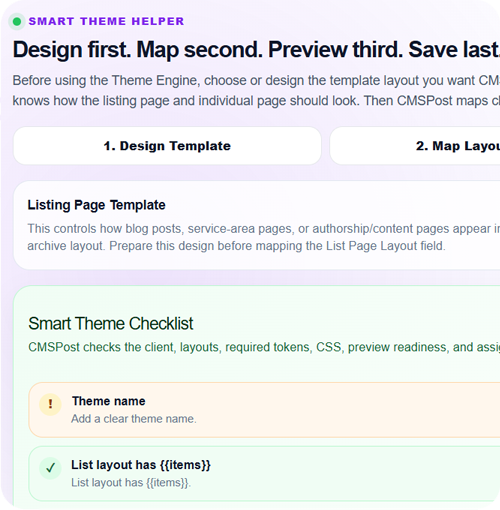
Embed Insights lists, service-area lists, content-page lists, and single CMSPost pages without recreating the client’s theme.

CMSPost can load page titles, meta descriptions, canonical URLs, Open Graph tags, Twitter tags, and advanced schema markup designed to support Google Search, AI-powered discovery, and voice-search experiences.

Use the Theme Engine, Mirror Mode, Static Pull Mode, or WordPress workflows when CMSPost should control more of the complete page experience.
Once the website and content workflow are connected, CMSPost keeps the relationship side of delivery organized too—without turning the homepage into another feature catalog.
Publish client-safe content to connected channels while preserving the source client and workflow.
Explore Social →Keep leads, replies, notifications, branded email, and conversation history tied to the client.
Explore Communications →Keep contact and consent context connected while supported marketing platforms handle campaigns.
Explore Email →Manage review activity, response context, widgets, and reputation workflows around the same client.
Explore Reputation →Connect your agency's own OpenAI API key in CMSPost AI Settings, use the AI Content Wizard for structured drafts, turn Keyword Intelligence into 30/60/90-day publishing plans with SEO Autopilot, and use AI RSS Feed Intelligence to build topic- and location-focused content streams from trusted sources. Content, SEO, metadata, schema, publishing plans, feed intelligence, review, and deployment stay inside the same protected client workflow.
Connect the agency's own key instead of relying on a shared CMSPost AI credential. The saved key is protected inside the agency installation and can be tested from AI Settings.
Start from the client, content type, keyword, goal, and business context to build draft copy, supporting keyword direction, metadata, calls to action, and structured data.
Enter a topic or keyword and optional location, combine trusted RSS sources, apply required keywords, location filters, exclusions, content ordering, and duplicate protection, then publish the resulting feed through a reusable CMSPost token.
Turn Keyword Intelligence into a continuous publishing strategy with 30-, 60-, or 90-day plans, configurable weekly volume, content-type selection, opportunity scoring, exclusions, and Manual, Approval, or Autopilot modes.
Keep the agency in control of client facts, brand voice, SEO fields, schema, publishing rules, and deployment. Approval workflows remain available whenever a team wants a review checkpoint before content goes live.
CMSPost Network is the professional knowledge layer for SEO, AEO, GEO, technical search, local SEO, content, analytics, development, social media, and agency operations. Members can ask implementation-focused questions, publish practical answers, mark accepted solutions, join focused communities, and build topic-specific reputation around problems they actually solve.
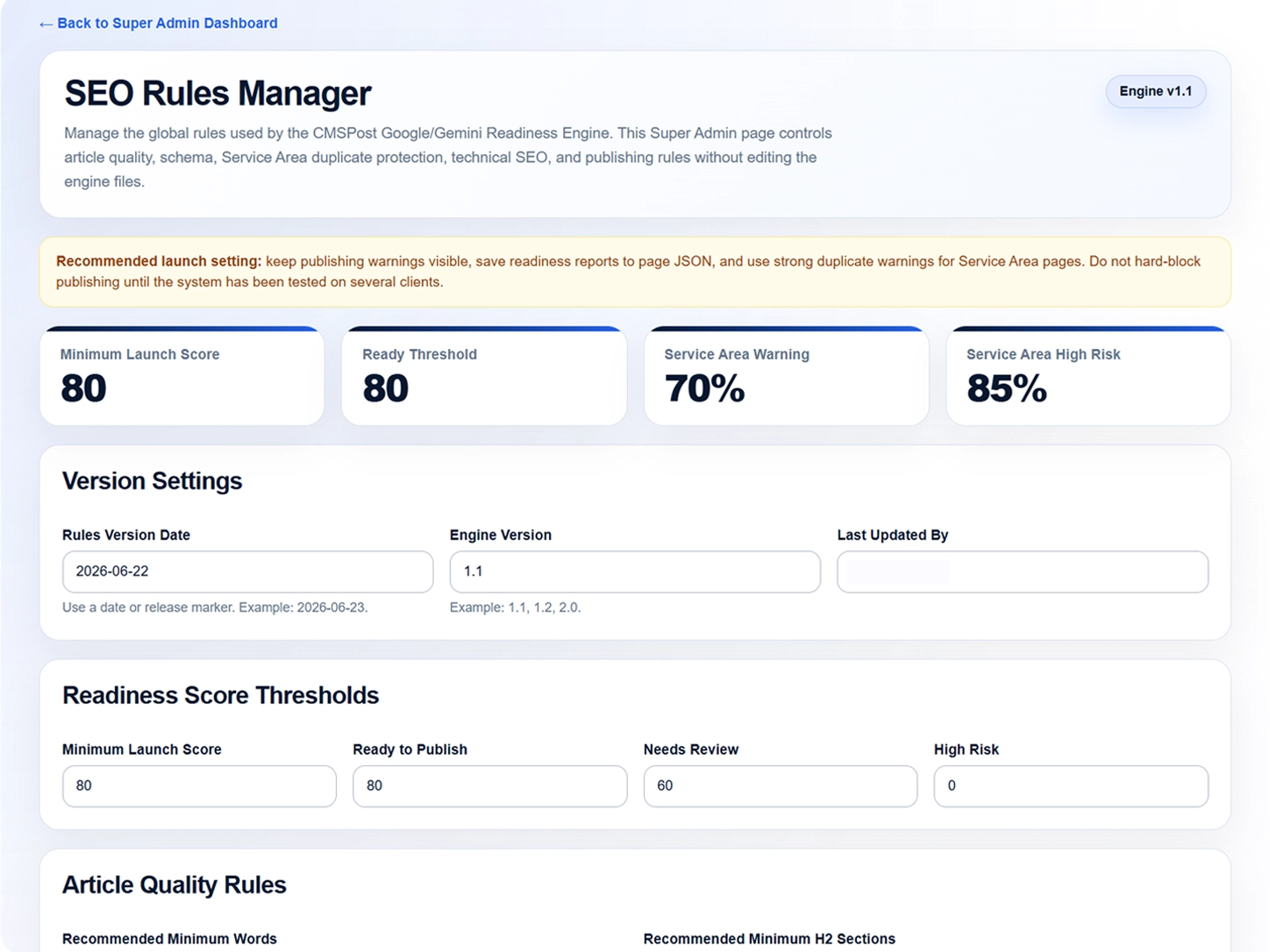
CMSPost gives platform administrators a centralized SEO Rules Manager for controlling content structure, metadata, schema, headings, internal links, and optimization guidance across agency installations.
Set rules for titles, descriptions, headings, content length, keywords, schema, and links.
Give agencies clear optimization standards for blogs, service pages, authorship content, and local landing pages.
Structure content for traditional search, Google AI experiences, and AI-assisted discovery without claiming official endorsement.
Content created and published through CMSPost is earning prominent organic placements and appearing as a source in Google AI Overviews. This is the platform demonstrating its own publishing, SEO, schema, and discovery workflow in public.
 View evidence
Google AI Overview source
 View evidence
First organic result + AI source
 View evidence
First organic result + AI source
Updated as new CMSPost pages are discovered and verified across Google Search and AI experiences.
CMSPost gives every agency the same powerful platform while letting teams work with the level of guidance and control that best fits their experience.
Follow a clear path through setup and everyday agency workflows without having to understand every technical option before getting started.
Work directly across the core CMSPost platform with the guidance you need and the day-to-day controls experienced agency teams expect.
Go deeper into CMSPost infrastructure when your agency needs more control over deployment, search structure, templates, integrations and platform behavior.
You do not have to use every advanced capability on day one.
CMSPost connects social publishing, Google tools, payments, communications, websites, and hosting environments without forcing agencies to replace the systems their clients already use.
Six publishing platforms have been successfully connected and tested. Reddit is displayed separately while platform access approval is pending.

Platform compatibility may depend on hosting access, account permissions, subscription level, API approval, and available custom-code capabilities.
 CMSPost Platform
 GEO SEO Engine
 Advanced Schema & Entity Engine
Content Engine
Theme Engine
Render Engine
Deployment Engine
Social Media Engine
Client Social Account Engine
Communications Engine
Reputation Management Engine
Smart Import Engine
Agency & Client Management
White-Label Engine
Agency Onboarding Engine
Licensing & Activation Engine
Safe Update Engine
Demo Workspace & Trial Safety
Overall Architecture
Advanced Schema & Entity Engine
Content Engine
Theme Engine
Render Engine
Deployment Engine
Social Media Engine
Client Social Account Engine
Communications Engine
Reputation Management Engine
Smart Import Engine
Agency & Client Management
White-Label Engine
Agency Onboarding Engine
Licensing & Activation Engine
Safe Update Engine
Demo Workspace & Trial Safety
Overall Architecture
AI-generated product assessments based on CMSPost architecture,
functionality, development discussions and documented testing milestones.
These assessments are not customer testimonials or an endorsement by OpenAI.
CMSPost combines agency-server installation, white-label client management, localized SEO content, website publishing, social media, client communications, and reputation tools in one agency-controlled platform.
Install CMSPost on your agency’s server and manage protected client workspaces, SEO content, service-area pages, publishing, social media, Google reviews, and reputation from one installation.
| Platform Capability | CMSPost Built for Agencies | HighLevel | Vendasta | DashClicks |
|---|---|---|---|---|
| Delivery model | Downloadable licensed agency installation | Vendor-hosted SaaS platform | Vendor-hosted agency platform | Vendor-hosted software and fulfillment platform |
| Installed on the agency’s server | Yes | No | No | No |
| Separate client environments | Protected workspace for every client | Client subaccounts | Business accounts and client portal | Client dashboards |
| Existing website onboarding | Smart Import scans and stages existing content | Not a central platform workflow | Depends on the selected product or service | Depends on the selected service |
| Hyperlocal GEO service-area engine | Native GEO builder with city/service targeting, location tokens, and city-specific local overrides | May require additional tools or workflows | Local SEO tools within a broader platform | Commonly provided through fulfillment services |
| Per-city modular content blocks | Reusable CTA, FAQ, hiring, grid, table, city-loop, proof, and internal-link blocks with city-by-city customization | See current vendor capabilities | See current vendor capabilities | See current vendor capabilities |
| Advanced schema + entity data | Advanced JSON-LD entity graph tied to the client, page, service, location, author, FAQs, breadcrumbs, and supported page entities | See current vendor capabilities | See current vendor capabilities | See current vendor capabilities |
| Flexible website deployment | Embed, Mirror Mode, Static Pull, and WordPress deployment options for existing client websites | Primarily platform-managed publishing tools | Product-dependent | Website and fulfillment options |
| Client-specific email marketing | Client-isolated contacts, audiences, campaigns, templates, consent records, provider connections, sending activity, and reporting inside each protected client workspace | See current vendor capabilities | See current vendor capabilities | See current vendor capabilities |
| Social media publishing | Facebook, Instagram, LinkedIn member publishing, X, and YouTube are ready. Pinterest is coming soon. Reddit API access and LinkedIn Company Page publishing are under provider review. | Available | Available | Available |
| Agency email and client communications | Centralized Communications Center with branded templates, lead notifications, customer confirmations, user invitations, alerts, activity logs, and provider-based delivery | Email and workflow communications available | Email and client communication tools available | Email and fulfillment communications available |
| Partner recurring revenue | 30% direct referral residual commission | See current vendor partner terms | See current vendor partner terms | See current vendor partner terms |
| Reviews and reputation | Google review widgets and reputation workflows | Reputation management available | Reputation tools available | Reputation and fulfillment options |
A vendor-hosted sales and marketing platform centered on CRM, funnels, workflow automation, communication, reputation, and client subaccounts.
A vendor-hosted agency ecosystem offering white-label client portals, local-business tools, resellable products, and fulfillment services.
A vendor-hosted white-label software and fulfillment platform designed to help agencies resell services and manage client reporting.
Comparison reflects publicly available platform information and positioning as of July 2026. Product features, pricing, usage charges, and availability may change. CMSPost is not affiliated with the other platforms displayed.
Choose your package based on the number of client domains your agency needs to manage.
Package names, prices, trials, and client-domain limits are loaded directly from the CMSPost Super Admin package configuration.
Explore CMSPost free for 30 days with one client domain. Test AI-powered SEO, GEO content, and publishing workflows. Bring your own AI API key. Upgrade to continue after your trial.
Up to 1 client domain
Built for growing agencies managing up to 10 client domains. Create AI-powered SEO content, optimize for GEO, publish across channels, and manage client marketing from one platform.
Up to 10 client domains
Designed for growing agencies managing up to 25 client domains. Scale AI-powered content, SEO, GEO, social publishing, and client workflows with centralized automation.
Up to 25 client domains
Active packages are loaded from Super Admin. Paid packages become checkout-ready after their matching Stripe Price is synchronized.
Apply to the CMSPost Partner Program, receive your secure referral identity, and introduce qualified agencies to a platform created for their daily workflow.
See how CMSPost is installed, how client workspaces stay separated, how the CMS + CRM model works, and how the connected agency engines fit together from onboarding through ongoing delivery.
CMSPost is a downloadable, white-label agency platform created for SEO agencies, digital marketing companies, consultants, and professionals managing multiple client websites and marketing workflows.
After purchasing a plan, your agency receives a licensed CMSPost package and a secure download link. CMSPost is installed on your agency’s compatible hosting environment, activated with your license, and branded for your agency.
Unlike a conventional vendor-hosted platform, CMSPost operates from your agency’s own installation, giving you greater control over your branding, client experience, users, and platform environment.
Yes. CMSPost is designed to work alongside existing client websites. Smart Import can scan and stage current website content, while Universal Content Embed can publish directly inside the website without requiring a theme rebuild.
Agencies can keep the client’s existing design with content-only Embed Mode, or use the Theme Engine, Mirror Mode, Static Pull Mode, and WordPress workflows when more control is needed.
Yes. Each client can have a protected workspace containing their business profile, website theme, content, service areas, publishing settings, social connections, review tools, communication settings, email templates, and assigned users.
Client records, website settings, connected accounts, and communication activity remain separated from other client workspaces.
Every plan includes the core CMSPost agency platform, including client onboarding, SEO content, service-area pages, website publishing, social media tools, branded communications, Google review tools, reputation workflows, and protected client dashboards.
Plans are primarily based on the number of client domains the agency needs to manage. Higher plans provide expanded client capacity, workflows, team access, onboarding assistance, and support.
The Communications & Email Engine gives agencies one centralized place to manage branded email templates, website lead notifications, customer confirmations, user invitations, system alerts, publishing notifications, and other client communications.
Messages are delivered through the agency’s configured email provider. CMSPost can record sent, delivered, opened, clicked, failed, bounced, or complaint activity where the selected provider supports those events.
Qualified agencies, consultants, and marketing professionals can apply to the CMSPost Partner Program.
Approved partners receive a unique referral link and access to a secure Partner Portal for tracking referrals, eligible recurring commissions, approvals, earnings, and payouts.


 SEO content and blog publishing