



CMSPost
Close Menu
CMSPost Agency Operating System

One Agency Platform. A CMS + CRM Built to Work Together.

Manage client websites, content, leads, contacts, communications, social publishing, reviews, team access, and account activity from one connected white-label system—installed for your agency and organized around every client you serve.

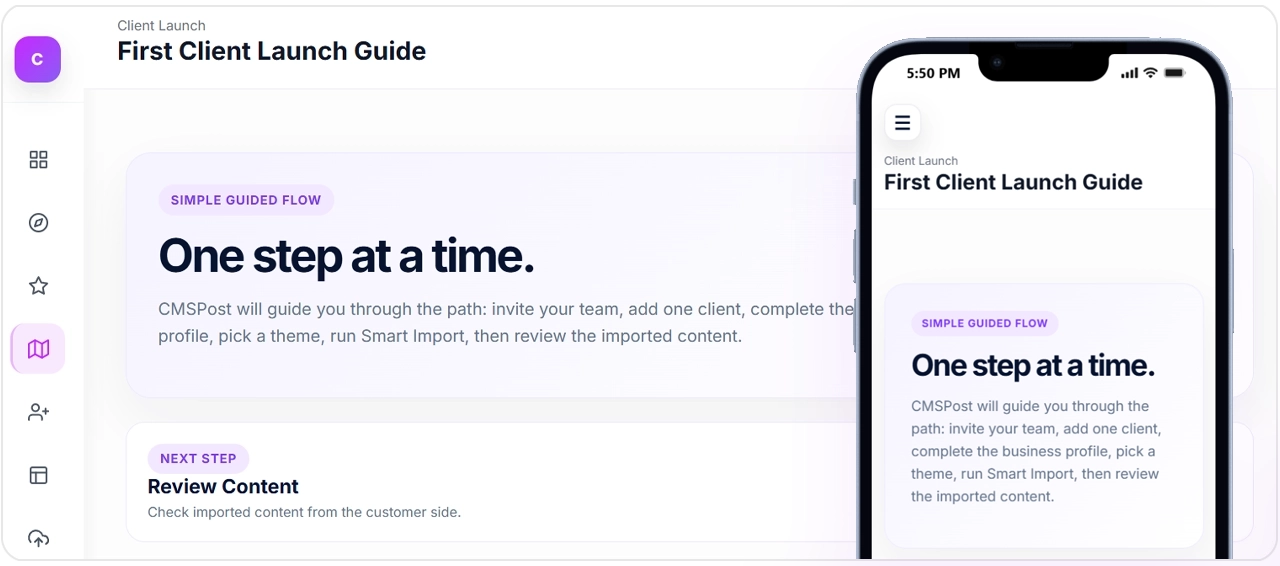
CMSPost agency platform and first client launch workspace
The Core of CMSPost

Two Systems Agencies Usually Stitch Together. We Built Them as One.

CMSPost combines a client-centered content management system with a relationship-centered CRM, so the work your agency publishes and the people, leads, conversations, accounts, and activity behind that work stay connected instead of disappearing into separate software.

Agency CMS

Build, Manage, and Publish Client Content Without Rebuilding Their Business.

The CMS side of CMSPost gives your agency a structured place to manage website content across multiple clients while preserving the websites, brands, and publishing environments they already use.

  • Manage blogs, content pages, GEO pages, service-area pages, authorship content, metadata, schema, and internal linking.
  • Use Smart Import to discover and stage content from an existing client website instead of starting from zero.
  • Keep each client’s content, business data, themes, service areas, and publishing settings separated in its own workspace.
  • Publish through Universal Content Embed, Theme Engine workflows, Mirror Mode, Static Pull, or WordPress depending on the client environment.
  • Turn approved website content into connected social publishing workflows instead of recreating the same campaign in another tool.
What the CMS solves Agencies stop managing client content through scattered WordPress logins, folders, spreadsheets, one-off scripts, and disconnected publishing tools. CMSPost gives the delivery team one repeatable system.
Agency CRM

Keep the Entire Client Relationship Attached to the Work You Deliver.

The CRM side of CMSPost is not just a contact list. It organizes the agency relationship around the client workspace so leads, contacts, users, communications, connected accounts, reputation activity, and ongoing work can live in the same operational context.

  • Maintain client profiles, contacts, domains, assigned users, account context, and relationship activity.
  • Capture website submissions through forms and keep the resulting lead context connected to the correct client.
  • Centralize branded email, website lead notifications, customer confirmations, threads, replies, and system notifications.
  • Keep client social connections and other account integrations isolated instead of mixing credentials across customers.
  • Attach review and reputation workflows to the client record so communication, response activity, and retention work stay organized.
What the CRM solves Agencies stop losing customer context between email inboxes, forms, spreadsheets, social logins, review tools, and team members. The relationship becomes part of the operating system instead of an afterthought.
CMS = What You Deliver Content, websites, SEO, service areas, publishing, social distribution, and the client’s digital presence.
+
CRM = Who You Deliver It For Clients, contacts, leads, users, communications, connected accounts, reputation, and relationship history.
The Problem CMSPost Eliminates

Agencies Do Not Need Another Tool. They Need One Operating System.

Every client adds websites, logins, inboxes, forms, contacts, campaigns, social accounts, reviews, passwords, and one-off processes. CMSPost turns that patchwork into one client-centered operating layer.

Before CMSPost

The agency runs on disconnected systems.

01
Website DashboardsDifferent logins and publishing processes for every client.
02
CRM + SpreadsheetsContacts, domains, leads, notes, and history split apart.
03
Forms + InboxesLead context disappears between submissions and follow-up.
04
Social + Review ToolsMore credentials, more tabs, and more client-specific processes.
05
Team KnowledgeThe workflow lives in people's heads instead of the system.
Connected Client Context
Agency Operating System

One client. One context. One operating layer.

The CMS manages what your agency delivers. The CRM keeps who you deliver it for connected to the work.

CMSCRMFormsInboxSEOSocialReviews
With CMSPost

The client becomes the center of the agency workflow.

One Client WorkspaceBusiness profile, domain, users, contacts, settings, and history together.
One Delivery SystemContent, SEO, service areas, publishing, and distribution connected.
One Relationship LayerForms, leads, conversations, confirmations, and follow-up stay in context.
Protected Client ConnectionsSocial, review, email, and platform access remain client-specific.
One Repeatable Agency ProcessTrain the team once and launch new clients through the same operating model.
One client context powers the entire lifecycle
1 Acquire

Capture and Organize Demand

Turn website visitors into structured lead and contact context your agency can continue working.

FormsCRMEmail
2 Deliver

Build and Publish Client Work

Create search-ready content and distribute approved work across the website and connected channels.

SEOWebsiteSocial
3 Retain

Communicate and Protect Reputation

Keep conversations, follow-up, reviews, and relationship history attached to the client as the account grows.

InboxReviewsReputation
Connected Platform Engines

The CMS + CRM Is the Core. These Engines Turn It Into an Agency Operating System.

Use each capability independently when needed, or connect them so client acquisition, delivery, communication, publishing, and retention happen inside one operational framework.

01

CRM & Client Management

Give every client one relationship record for contacts, domains, leads, users, conversations, review activity, connected accounts, and ongoing agency work.

Client workspaces Lead context Relationship history
Explore Solution
02

Forms & Lead Capture

Build client forms, embed them on existing websites, capture submissions, create lead context, and continue follow-up inside CMSPost.

Form builder Embeds Lead inbox
Explore Solution
03

Communications

Centralize website leads, customer threads, notifications, branded replies, and reusable communication workflows in the correct client context.

Inbox Threads Notifications
Explore Solution
04

Email Marketing

Connect consent-aware contacts to marketing providers, organize audience activity, and use provider credentials, API keys, and embed workflows where supported.

Mailchimp Constant Contact Provider keys
Explore Solution
05

SEO & Service Areas

Create blogs, GEO pages, service-area pages, metadata, advanced schema, reusable location tokens, and flexible website publishing workflows.

GEO content Schema Service areas
Explore Solution
06

Social Media

Create, review, schedule, and publish client-approved content while keeping agency accounts and customer social connections isolated.

Facebook Instagram LinkedIn
Explore Solution
07

Reviews & Reputation

Connect business locations, organize review workflows, display reputation signals, and keep response activity attached to the client workspace.

Google reviews Widgets Response workflow
Explore Solution
Connections and Compatibility

CMSPost Sits at the Center of the Platforms Your Agency Already Uses.

Keep the specialist tools that make sense. CMSPost becomes the client-aware operating layer that connects the relationship, content, permissions, publishing, communication, and delivery context around them.

Marketing + Communications

Keep the Providers Your Team Already Trusts.

CMSPost keeps the client and workflow context organized while external providers continue handling their specialized delivery and campaign services.

Mailchimp
Marketing Ecosystem
Constant Contact
Marketing Ecosystem
Postmark
Delivery Provider
Resend
Delivery Provider
Connected Client Context
CMSPOST
Agency Operating System

One Client. One Context. One Operating Layer.

CMSPost keeps the client record, content, forms, communications, publishing, reputation, and connected account context organized while outside platforms do what they do best.

CMS CRM Forms Inbox SEO Social Reviews
Website + Delivery Environments

Keep the Client Website. Add the CMSPost Operating Layer.

Publishing and embed compatibility depends on the client environment, hosting access, available custom-code controls, permissions, and deployment method.

WordPress
Squarespace
GoDaddy
Hostinger
Bluehost
WP Engine
The Architecture
Keep the Specialist Tools. Eliminate the Disconnected Workflow. Client context stays organized in CMSPost while specialist platforms continue handling the channels and services they already do well.

Provider and platform availability can depend on account eligibility, API or developer access, permissions, subscription level, OAuth approval, custom-code capability, and the connected client environment.

Your Agency. Your Platform.

Replace the Patchwork With an Agency Operating System You Control.

Install CMSPost, apply your branding, add your clients, and give your team one connected CMS + CRM for content, leads, communications, SEO, publishing, social media, email marketing, reviews, and reputation.

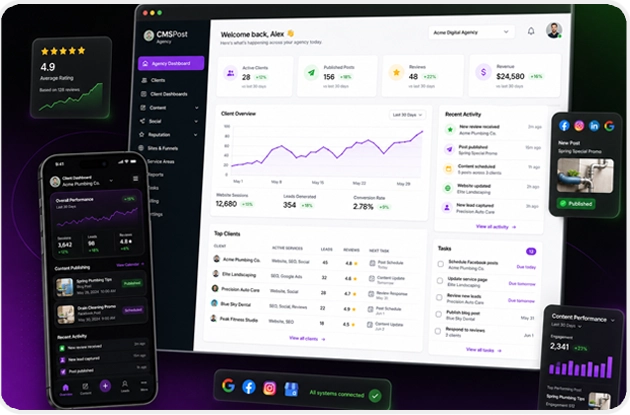
CMSPost agency operating system dashboard