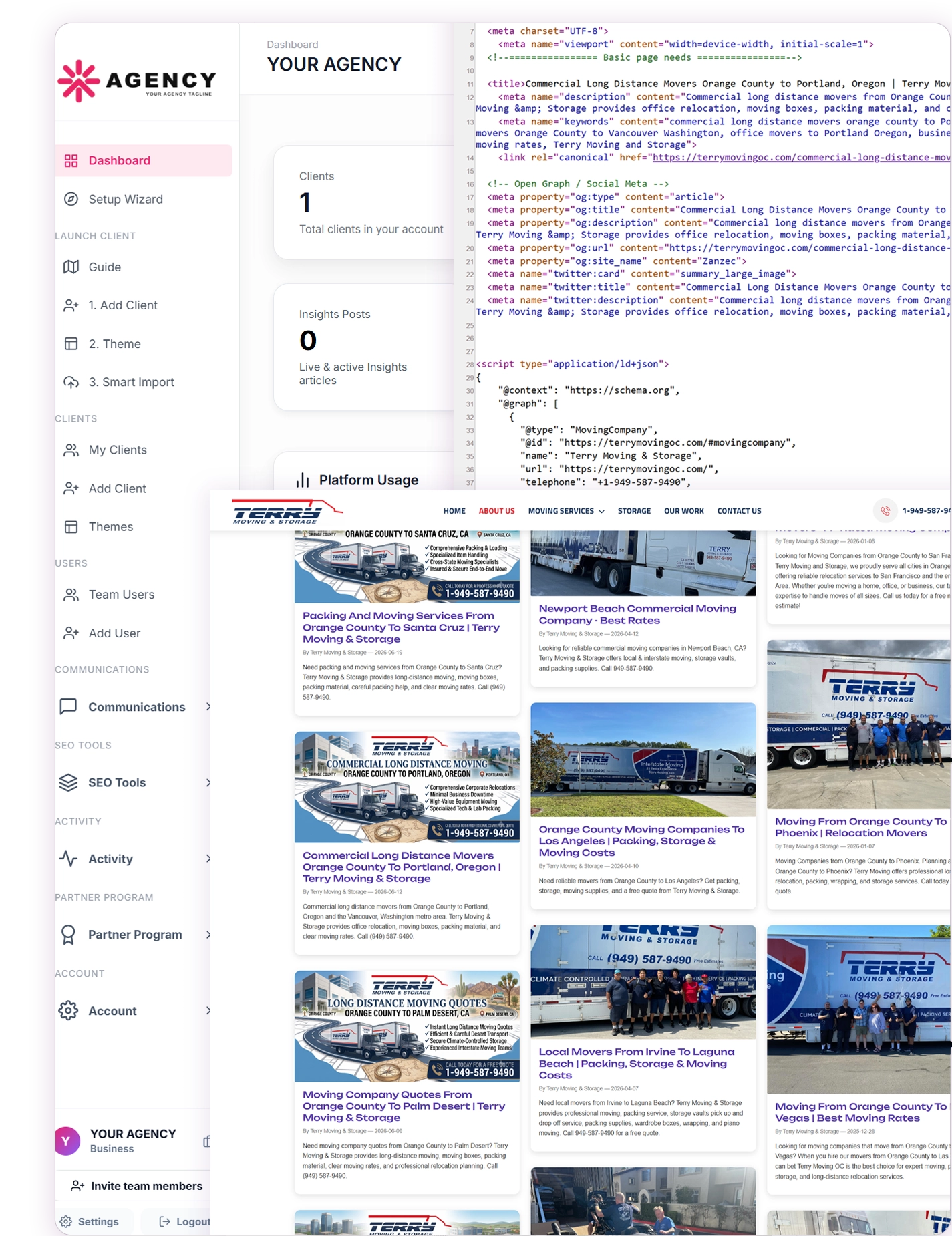
Your Server. Your Brand. Every Client in One Platform.
Install CMSPost on your agency’s compatible hosting environment, brand it as your own, and manage client onboarding, SEO content, website publishing, social media, communications, Google reviews, and reputation from one lightweight, modular, protected platform.
Home
•
Insights
•
Create Blog Posts, Articles, and Social Media Content from One Connected Workflow
Create Blog Posts, Articles, and Social Media Content from One Connected Workflow
By CMS POST INC
Connected Content Operations
Create Blog Posts, Articles, and Social Media Content from One Connected Workflow
Agencies rarely struggle because they lack ideas. They struggle because one useful idea becomes disconnected as it moves from research to a blog draft, website page, SEO review, client approval, social caption, publishing destination, and performance conversation. CMSPost gives agencies a connected content workflow for creating, organizing, repurposing, and publishing client content while keeping the business, domain, users, metadata, social connections, and delivery context together.
The Content Problem Is Usually the Handoff
A traditional agency content process often begins in one tool and ends in five others. Research lives in notes. The working draft sits in a document. Metadata is kept in a spreadsheet. Images arrive through email. Approval happens in a message thread. Website publishing requires a separate login, while social posts are rebuilt inside another scheduling platform.
Each handoff removes context. A writer may not know which domain, offer, service area, or audience the strategist intended. A social editor may receive the article but not the approved headline, preferred landing page, or current campaign. A publisher may have the final copy but miss the canonical URL, schema, image text, or client-specific deployment settings.
The result is not merely inconvenience. Fragmentation creates duplicate work, inconsistent messages, weak internal linking, publishing delays, and a higher chance of using the wrong client asset or destination. A connected content workflow reduces those gaps by keeping the work attached to the client from the beginning.
Begin with One Client-Aware Source of Truth
CMSPost starts with the protected client workspace. The business profile, website domain, users, content, service areas, publishing settings, social connections, communications, and related activity remain associated with that customer instead of becoming records in one shared agency pool.
This structure gives the team a clear answer to the most important operational question: Who is this content for? Once the active client is established, an idea can move through creation and distribution without losing its business identity. The source record can carry the topic, audience, keyword focus, page type, featured image, metadata, schema, destination URL, and relationship to other client content.
That continuity matters when an agency manages many companies with similar services. Two clients may both publish about local SEO, home services, healthcare, or professional advice, but their brand language, claims, locations, offers, images, accounts, and approval requirements must remain separate.
Create More Than a Standalone Blog Post
A blog post is one useful format, but agency content programs usually require a broader library. CMSPost can organize blogs, articles, insights, authorship content, resources, standard website pages, GEO campaigns, and service-area pages inside the correct client environment.
The format should follow the purpose. A detailed educational article can answer a customer question and build topical depth. An authorship page can explain professional experience and editorial responsibility. A resource can support lead nurturing. A service page can describe a commercial offering. A location page can connect a real service with a relevant market. A social post can introduce the idea to a network and guide the right audience toward the full resource.
Keeping these formats in one system does not mean making them identical. It means the agency can understand how they relate. The article may become the primary source, while supporting website pages, internal links, and social adaptations extend its usefulness.
Organize the Library Before It Becomes a Content Maze
As an agency publishes more work, findability becomes as important as creation. Titles alone cannot explain the entire content library. Teams need to distinguish drafts from published work, blogs from service pages, one client from another, and evergreen resources from time-sensitive announcements.
CMSPost keeps content connected to client records and supports organized website destinations such as visual article listings and individual crawlable URLs. Categories, tags, dates, featured images, titles, and summaries can help visitors and agency teams browse the growing collection. Related content and internal links can create clearer paths between educational resources, service pages, and local markets.
This gives the agency a reusable publishing asset rather than a folder of completed assignments. An older article can be updated, linked from a new page, adapted for a social campaign, or used to answer a recurring customer question without starting over.
Keep SEO Metadata and Structured Data with the Page
Visible copy is only one part of a publish-ready page. The workflow may also require an SEO title, meta description, canonical URL, robots instructions, featured-image information, Open Graph data, social-card metadata, headings, internal links, and a structured-data graph that accurately represents the content visitors can see.
CMSPost keeps these search and publishing elements connected to the content record. Appropriate schema can describe the organization, website, webpage, primary image, article, breadcrumb path, software or service context, and visible questions and answers. The exact graph should reflect the page rather than adding unsupported entities simply to make the markup larger.
Structured data can help machines interpret the page, but it does not guarantee rankings, rich results, citations, or inclusion in AI-generated responses. Search engines decide whether to crawl, index, display, or enhance a URL. The agency’s responsibility is to publish accurate content, use technically valid markup, and maintain a coherent website structure.
Repurpose the Idea Without Flattening Every Channel
Content repurposing should preserve the core idea while changing the presentation. A 1,500-word article is designed for depth, context, internal linking, and long-term website value. A social post may need a concise opening, a different image crop, a direct link, a shorter call to action, or a platform-specific tone.
CMSPost allows existing blog, website, GEO, service-area, and other client content to become source material for social-ready posts. The source relationship helps the team understand where the social message came from and which page it should support. The agency can adapt the caption, media, link, and destination instead of copy-pasting one block everywhere.
For example, one client article can become a professional insight for LinkedIn, a concise update for X, an image-led caption for Instagram, a Page update for Facebook, or the supporting context for a YouTube publishing workflow. Availability, permissions, media rules, scheduling capabilities, and account eligibility still vary by network, so every destination should follow its supported workflow.
Connect Drafting, Review, Scheduling, and Publishing
A connected workflow becomes valuable when it carries the content beyond creation. The agency should be able to identify the active client, review the source, confirm the page or social destination, inspect the media and link, and understand whether the item remains a draft, is prepared for scheduling, has been published, or requires attention.
This does not remove human review. It makes review more useful because the reviewer can see the client and destination context. Brand claims, regulated topics, local details, dates, offers, permissions, citations, and platform requirements may still require a qualified person before publication.
After approval, CMSPost supports flexible website deployment through Universal Content Embed, Mirror Mode, Static Pull, the Theme Engine, and WordPress-oriented workflows, depending on the client website and hosting environment. Supported social publishing remains attached to the client’s isolated account connections rather than a shared agency authorization.
Turn One Approved Idea into a Repeatable Content System
Select the client. Begin inside the correct protected business and domain context.
Define the purpose. Choose the audience, topic, search intent, offer, destination, and desired action.
Create the source content. Build the blog, article, resource, website page, GEO asset, or service-area page.
Prepare the publishing layer. Add the title, description, canonical URL, featured image, internal links, and appropriate schema.
Review the complete record. Confirm accuracy, brand alignment, client approval, and destination readiness.
Publish to the website. Use the deployment method appropriate for the existing client environment.
Create channel-specific adaptations. Turn the approved source into tailored social captions, media, links, and supported destination selections.
Preserve the activity context. Keep the source, client, status, publishing outcome, and future update path connected.
This sequence turns individual deliverables into a repeatable agency service. The team can build once, adapt responsibly, publish through the correct systems, and return to the same source when the campaign evolves.
Create More Client Value from Work the Agency Already Performs
Agencies often price content creation, SEO, website management, and social media as separate services because the work happens in separate software. A connected content workflow makes the relationship between those services visible. The article supports the website. The website URL supports social distribution. The social campaign gives the article another path to discovery. The content library strengthens future internal linking and customer education.
This creates practical opportunities for recurring service. An agency can plan topics, create source content, maintain metadata and schema, publish to the website, prepare social adaptations, review older resources, and update campaigns as the client’s services and markets change.
CMSPost is designed to keep that work attached to one client operating context. Instead of multiplying dashboards as the agency adds services, the team can create, organize, repurpose, publish, and maintain connected content from one white-label platform.
Build a Content Workflow That Continues After Publish
CMSPost helps agencies turn client ideas into organized website content, search-ready pages, and platform-adapted social media posts while preserving the client, domain, metadata, schema, destination, and publishing context.
What is a connected content workflow for agencies?
A connected content workflow keeps the client, source idea, website content, metadata, schema, social adaptations, publishing destinations, and activity context organized together instead of scattering them across unrelated tools.
Can CMSPost create blog posts and website articles?
Yes. Agencies can create and organize blogs, articles, insights, authorship content, resources, website pages, GEO content, and service-area pages inside the appropriate client workspace.
Can one CMSPost article become social media content?
Yes. Existing blog, website, GEO, service-area, and other client content can become the source for social-ready captions, links, media, and destination-specific variations.
Does every social platform receive the same version of a post?
Not necessarily. CMSPost supports adapting the caption, media, link, presentation, and destination around each supported network rather than forcing one identical post everywhere.
How does CMSPost keep content separated between clients?
CMSPost organizes business profiles, domains, users, content records, website settings, social connections, media, and publishing activity inside protected client workspaces.
Does CMSPost support SEO metadata and advanced schema?
Yes. CMSPost supports content workflows that include SEO titles, descriptions, canonical URLs, social metadata, image information, and appropriate structured-data graphs connected to the visible page.
How can CMSPost content be published on an existing website?
Depending on the website and hosting environment, agencies can use Universal Content Embed, Mirror Mode, Static Pull, the CMSPost Theme Engine, or a WordPress-oriented publishing workflow.
Does CMSPost guarantee search rankings or social engagement?
No. CMSPost helps agencies organize, optimize, publish, and distribute content, but search engines and social networks independently determine crawling, indexing, visibility, ranking, reach, and engagement.
C
cmspost.com Editorial Team
Helpful perspectives, practical guidance, and resources published for our readers.